
Project
BUD: a university helpdesk built around its database
A C# and SQL Server helpdesk where service definitions generate ticket forms, and transactions keep requests, answers, and attachments together.
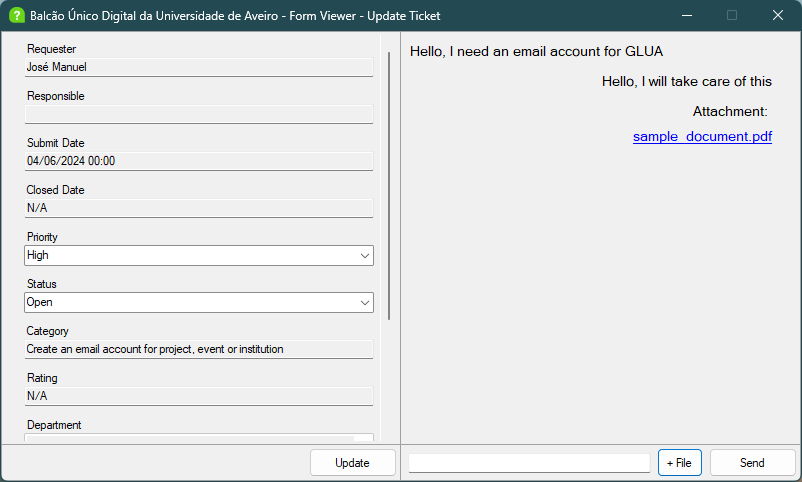
An email account request and a network connection request belong in the same helpdesk, but they need different information. One asks for an address and a project name; the other needs a location. That was the central design problem in BUD: supporting several kinds of university IT request without writing a separate screen for each one.
I built BUD with Miguel Reis in 2024 for the Databases course at the University of Aveiro. We shared the work equally, with my focus on the more complex database relationships and the Windows Forms interface. We used the university’s Balcão Único Digital as the setting for our own helpdesk implementation. The desktop application uses C#, with SQL Server storing the service catalogue, tickets, messages, attachments, and user memberships.
The form comes from the database
Creating a ticket starts with a service and a category. Choosing Email and then a request for a project email account produces fields for the department, desired address, project name, and responsible person.
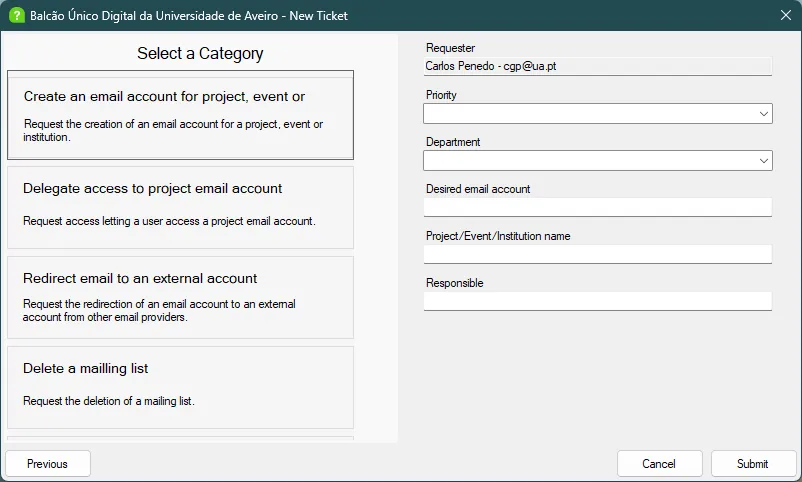
The selected category determines which details the requester needs to supply.
Four tables describe that form: service, category, field, and category_field. A SQL view joins them, and the client builds cards and input controls from the result. Categories also have a minimum role, which the client checks when loading the available choices.
An ordinary text field can therefore be added through database records and associations. There is no need to add another Windows Form. Department and room selectors are still special cases in the C# code; the metadata does not yet describe every input type or validation rule.
Submitted answers have their own table, ticket_field. This keeps the definition of a category separate from the values supplied for a particular request. Changing a category’s field associations does not erase answers already attached to tickets, although the referenced field definitions must remain available.
One submission, one transaction
The number of fields varies by category, so a fixed list of procedure parameters would be awkward. The client instead collects the answers into a DataTable and sends them to SQL Server as a table-valued parameter.
Inside CreateTicket, the procedure inserts the ticket, obtains its generated ID, and stores the supplied answers:
SET @ticket_id = (SELECT SCOPE_IDENTITY())

INSERT INTO BUD.ticket_field (ticket_id, field_id, [value])
SELECT @ticket_id, field_id, [value]
FROM @fields;
This excerpt sits inside a transaction with error handling. If storing an answer fails, the ticket insertion rolls back too. The caller can submit a different set of fields without changing the procedure’s signature.
The same idea applies to attachments. SendAttachmentMessage stores a message and its associated file in a transaction. The file bytes live in SQL Server as VARBINARY(MAX), and the conversation displays a link for saving and opening the attachment.
Following a request to resolution
Requesters see their own tickets. Staff get a shared queue with filters for service, category, priority, and status, along with controls for updating, reopening, and deleting requests.
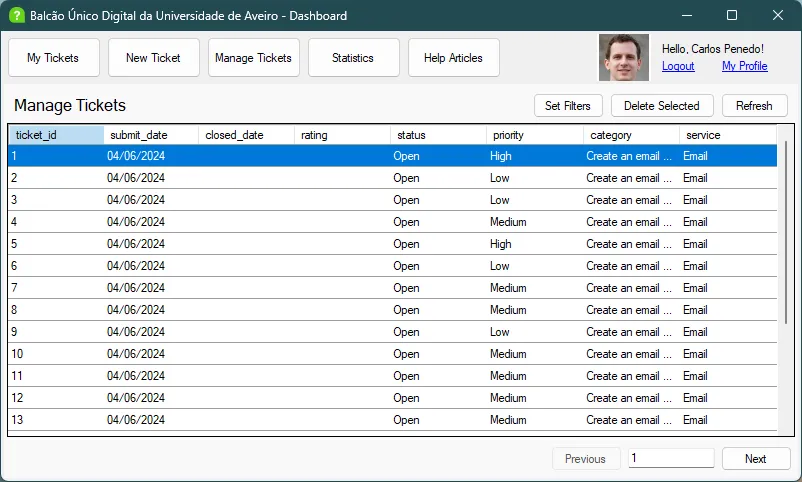
The staff view loads pages of 20 tickets, applying the selected filters in SQL.
Both views use the SeeUserTickets procedure. Passing a requester ID limits the results to that person; the staff view omits it and supplies pagination parameters. The database applies the filters before returning a page.
Closing a ticket records its closure date and lets the requester rate the resolution from zero to five. Reopening it clears both the date and the previous rating through a trigger. Otherwise, an active request could still carry the date and rating of an earlier resolution. Ticket deletion also removes the related conversation, attachments, and submitted fields.
The application includes searchable help articles and profiles showing department and role memberships with their dates. Those memberships are separate records, allowing one person to have more than one role or department.
Trying it with 20,000 tickets
The sample-data script generates 20,000 tickets. We used them to exercise the staff queue and compare queries before and after adding indexes on requester, priority, and status.
The saved experiment records the requester query falling from 110 ms to 34 ms and the priority query from 47 ms to 13 ms. These are individual development measurements: the script runs each query once and does not control for caching. They illustrate the access patterns we investigated, rather than establish an overall speedup for the application.
For deployment beyond the coursework setting, I would put a service layer between the desktop client and SQL Server. The current client connects directly with shared database credentials, and role checks largely control the interface. Enforcing permissions for each operation belongs at that service boundary. Richer form metadata would be the next step in extending the category system.
The repository includes the application, SQL scripts, relational diagrams, original report, and a video demonstration.